
How it works
From first login to first live call.
A guided setup turns your business information into a ready-to-test AI Employee — most businesses are live in under an hour.
Four steps to a working AI Employee
Tell us about your business
Answer a few plain-language questions about what you do, your hours, and how calls should be handled. No scripts to write.
Train your assistant
Scan your website and upload documents. KokuaOS reads it all and shows you what it learned so you can review and correct.
Test real scenarios
Try after-hours calls, appointment booking, message taking, and human handoff in the simulator before any customer calls.
Go live with confidence
Complete the readiness check, connect your number by forwarding or SIP, and start helping callers immediately.
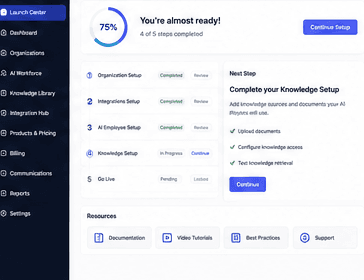
Launch Center
A guided checklist tracks you to go-live
KokuaOS walks you through setup step by step and shows exactly what's left before your AI Employee takes its first call.
Frequently asked questions
Do I need to replace my phone system?
No. Most businesses go live by forwarding calls to KokuaOS — instant and reversible. Businesses with a PBX can connect a SIP trunk instead. You keep your number.
How long does setup take?
Most businesses are live in under an hour. The guided setup does the heavy lifting and tells you exactly what to do next.
Can I test before customers use it?
Yes. The simulator and a final readiness check let you test greetings, questions, hours, messages, and handoffs before going live.
Get started
Meet your first AI Employee.
See how KokuaOS answers every call, books the work, and hands off to a human when it should.